From MVP Chaos to Scalable Excellence: Elevating UX for FORCE Platform

When I joined the FORCE team in late 2025, the tool had just launched and was already delivering real value at Charter. The team was growing fast. Our single scrum team swelled from 15 to 40 people almost overnight, then split into three separate scrum teams. As the only designer supporting all three, the scope was massive. But two weeks after I started, layoffs struck. The other Senior UX Designer and our Junior Designer were let go, leaving me as the sole designer. I quickly hired a new Junior to help share the load, only for him to leave the company after three weeks. Through the instability, and rapid expansion I kept momentum alive and helped FORCE evolve from a promising but rough MVP into one of Charter’s most essential and heavily used internal platformss which is powering the company’s next phase of network modernization.

COmpany:

Spectrum (Charter Communications)

Spectrum (Charter Communications)

Industry:

Telecom & Mass Media

Project name

FORCE (Framework for Orchestration, Resource Control, and Efficiency)

Timeframe

SEPT 2025 - MAR 2026

Stack:

Figma

Figma

Jira

Jira

Results Overview

Scale Unlocked, Satisfaction Skyrocketed

The redesigned interface delivered measurable improvements in scale, efficiency, user experience, and operational outcomes.

~ 300/night

Nightly RPD onboarding volume increased from about 100 to nearly 300 devices per night.

~ 300/night

Nightly RPD onboarding volume increased from about 100 to nearly 300 devices per night.

9.3/10

Internal CSAT rose from 6.4 out of 10 to 9.3 out of 10.

9.3/10

Internal CSAT rose from 6.4 out of 10 to 9.3 out of 10.

-78%

RPD activation workflows dropped from 42 minutes to 9 minutes per node (78 percent reduction).

-78%

RPD activation workflows dropped from 42 minutes to 9 minutes per node (78 percent reduction).

AEO Engineer (Network Ops):

“Job History and the Pending Onboarding Report changed everything. I used to waste hours piecing together what happened and which nodes were ready. Now I open one page and know exactly what’s next and why something failed. Also, the cleaner table made it actually pleasant to use.”

AEO Engineer (Network Ops):

“Job History and the Pending Onboarding Report changed everything. I used to waste hours piecing together what happened and which nodes were ready. Now I open one page and know exactly what’s next and why something failed. Also, the cleaner table made it actually pleasant to use.”

The company
What is Spectrum?

Spectrum is the consumer brand of Charter Communications, one of the largest telecommunications and mass media companies in the United States. The company is transitioning from traditional hybrid fiber coaxial networks to advanced Distributed Access Architecture and high-split upgrades.

The company
What is Spectrum?

Spectrum is the consumer brand of Charter Communications, one of the largest telecommunications and mass media companies in the United States. The company is transitioning from traditional hybrid fiber coaxial networks to advanced Distributed Access Architecture and high-split upgrades.

Background
Rejoining Charter on the FORCE Team

I rejoined Charter in October 2025 as a UX Designer IV on the FORCE team. I had previously worked at Charter from 2022 to 2024 as a UX Designer III on a different team, so I was already familiar with the company’s culture, tools, and enterprise design standards. FORCE is a cloud-native web application designed to automate and accelerate network upgrades, particularly the transition to the new Distributed Access Architecture (DAA). It streamlines critical workflows that previously depended on phone coordination between field technicians and operations centers. When I started, a single UX designer had supported the team for about a year, guiding the product from concept to MVP. The application had launched in production only three months earlier and was already reducing deployment delays and operational costs.

Background
Rejoining Charter on the FORCE Team

I rejoined Charter in October 2025 as a UX Designer IV on the FORCE team. I had previously worked at Charter from 2022 to 2024 as a UX Designer III on a different team, so I was already familiar with the company’s culture, tools, and enterprise design standards. FORCE is a cloud-native web application designed to automate and accelerate network upgrades, particularly the transition to the new Distributed Access Architecture (DAA). It streamlines critical workflows that previously depended on phone coordination between field technicians and operations centers. When I started, a single UX designer had supported the team for about a year, guiding the product from concept to MVP. The application had launched in production only three months earlier and was already reducing deployment delays and operational costs.

Problem
Underdeveloped Design System and Problematic UI Patterns

The previous designer delivered a functional MVP that enabled FORCE’s core workflows and demonstrated immediate business value. However, the design system lacked structure. Figma files relied on ad hoc edits to IBM Carbon components, lacking proper variants, tokens, auto-layout, or a centralized library. Core UI patterns created visual and usability issues. The Figma project was disorganized. The main Wireframes file was bloated with old versions, tabs were hard to navigate, and nearly full memory slowed performance and triggered recovery mode. While addressing these issues was essential, the constant pressure of new feature requests made a scalable design foundation even more urgent.

Solution
Rebuilt Design System and Elevated UI Patterns


Improved Design System Assets

I rebuilt a scalable, centralized design system by customizing IBM Carbon components with a tailored color system and refactoring typography scales and spacing increments.


Reorganized Figma Files

I restructured the bloated Final Wireframes file so its left-side tabs mirrored the FORCE app navigation, making pages easy to find. To fix near-full memory and improve performance, I split content into several files.


Re-designed UI Patterns

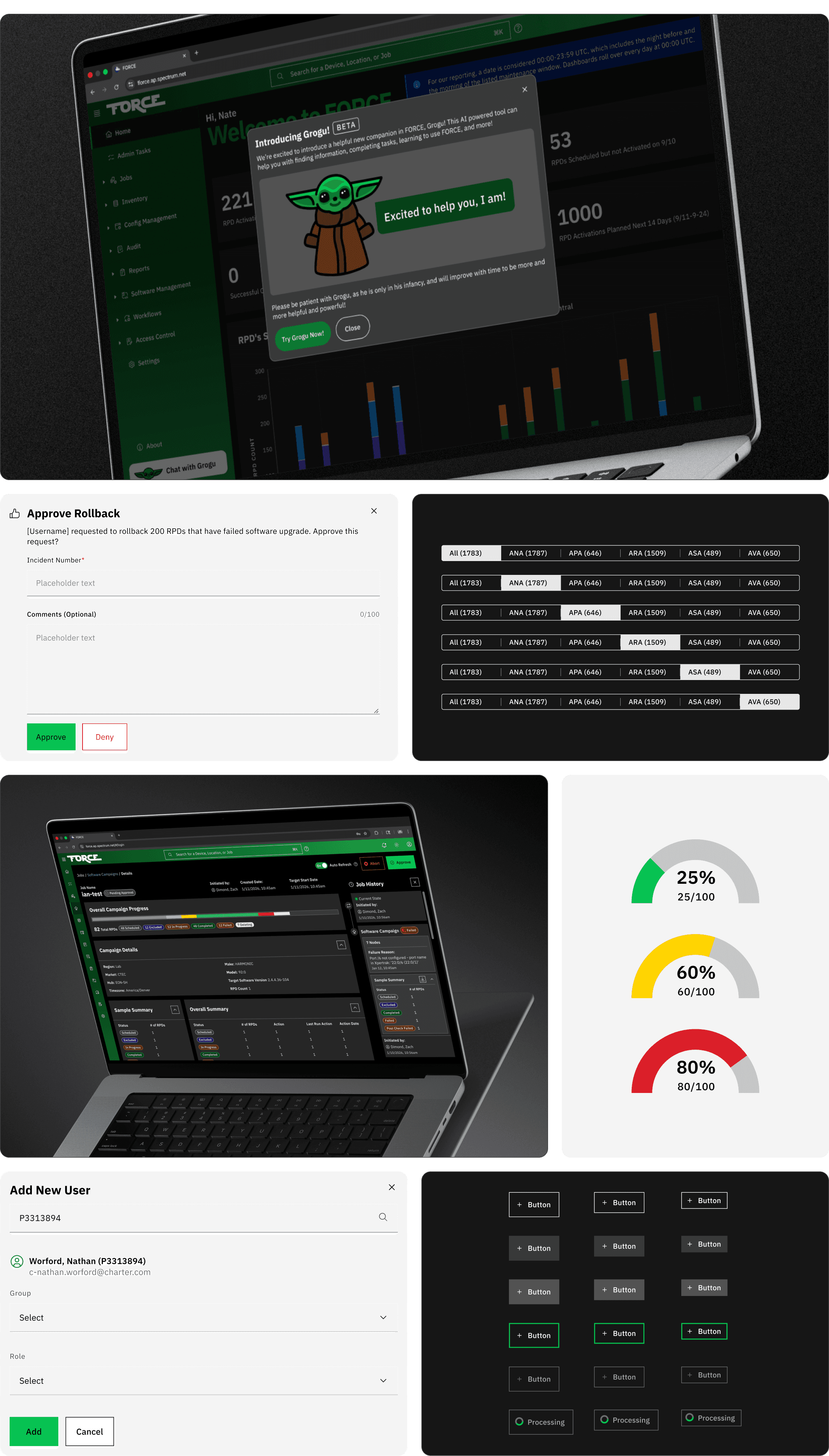
To reduce visual noise and improve hierarchy, I updated core components including Tables, Tabs, Buttons, and Page headings.


New Functionality Added

I designed and delivered high-impact features requested by users and stakeholders, including Global Search, Add a Device Workflow, Pending Onboarding Report, and Job History Column.

My Role and the Team
Leading UX Solo on Charter's Largest Agile Team

The FORCE team, based in Charter’s CTECII R&D office in Denver, Colorado, focuses on advanced network engineering. It started with about 20 members, quickly grew to around 40, and then split into three separate Scrum teams. As the Senior UX Designer, I supported and collaborated across all three. As the only designer and a member of leadership, I joined high-level planning sessions with managers, directors, and leads. I partnered closely with team leads on requirements and approvals, and worked directly with the Front-End Dev Lead on design implementation and handoff. When I joined, the design team had two other members. Two weeks later, Charter conducted a large-scale reduction in force, laying off 1,200 employees, including both of my design colleagues. I led hiring for a replacement UX Designer II, but that hire left after just three weeks. With further hiring frozen, I became the sole UX professional driving all design work amid rapid team growth and intense product development.

Project summary
From Launch Momentum to UX Transformation

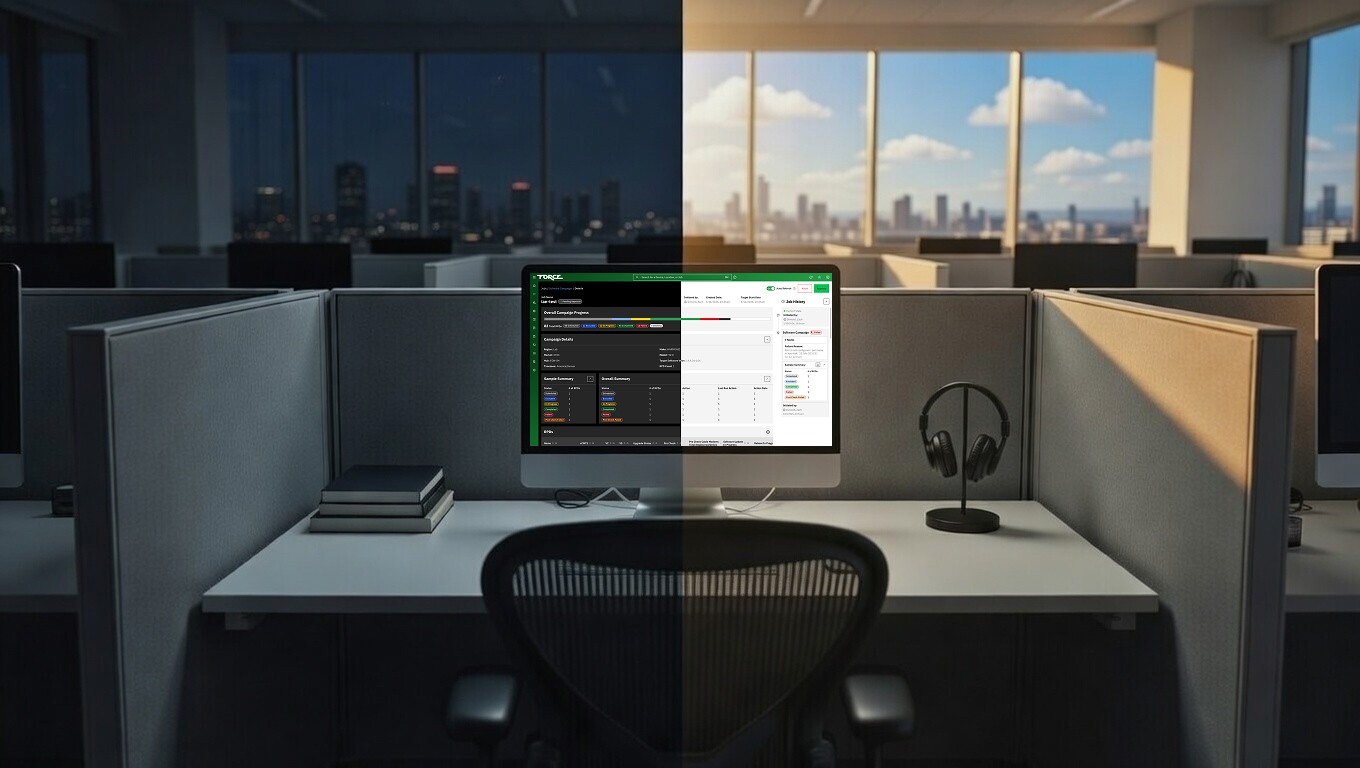
I rebuilt the design system with proper semantic tokens and scalable components. I reorganized Figma files for efficiency, refreshed key patterns for better hierarchy and clarity, and introduced high-value features, including Global Search, streamlined Workflows, and Job History tracking. I also ensured robust support for both light and dark modes to accommodate 24/7 usage. As the sole designer during a period of layoffs and rapid team growth, I implemented these changes, dramatically improving usability, reducing user cognitive load, and helping elevate FORCE into one of Charter's most reliable and widely adopted internal platforms.

Discovery
Understanding the App

In my first weeks on the FORCE team, I held in-depth sessions with engineers, product managers, and business analysts to deeply understand the application and its domain.
Discovery
Understanding the App

In my first weeks on the FORCE team, I held in-depth sessions with engineers, product managers, and business analysts to deeply understand the application and its domain.

Evolution of the Network Architecture

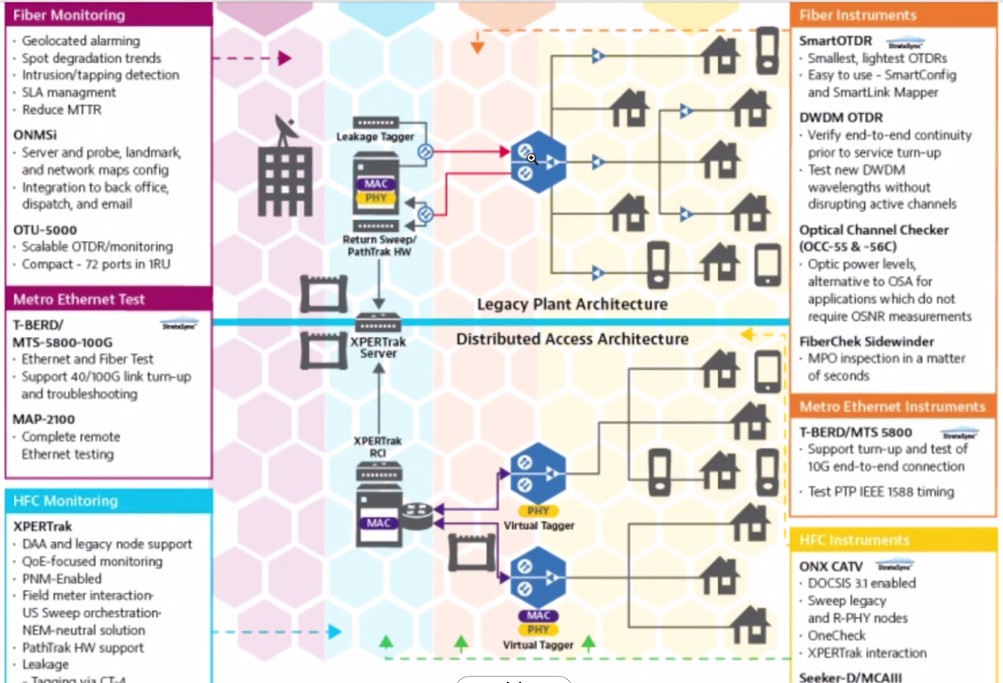
FORCE reflects Charter’s history of mergers. Node views in the app still display legacy tags like “TWC” (Time Warner Cable) and “BHN” (Bright House Networks) from acquired companies. More importantly, the platform drives the ongoing move from traditional cable delivery to modern hybrid fiber-coaxial (HFC) networks. The image below illustrates this evolution. On the left is the legacy architecture, which relies on radio towers broadcasting signals over coaxial cable to homes. On the right is the current Distributed Access Architecture (DAA), where fiber-optic cable carries high-capacity signals to neighborhood hubs for conversion closer to the customer.

The Role of the RPD in the Node Housing

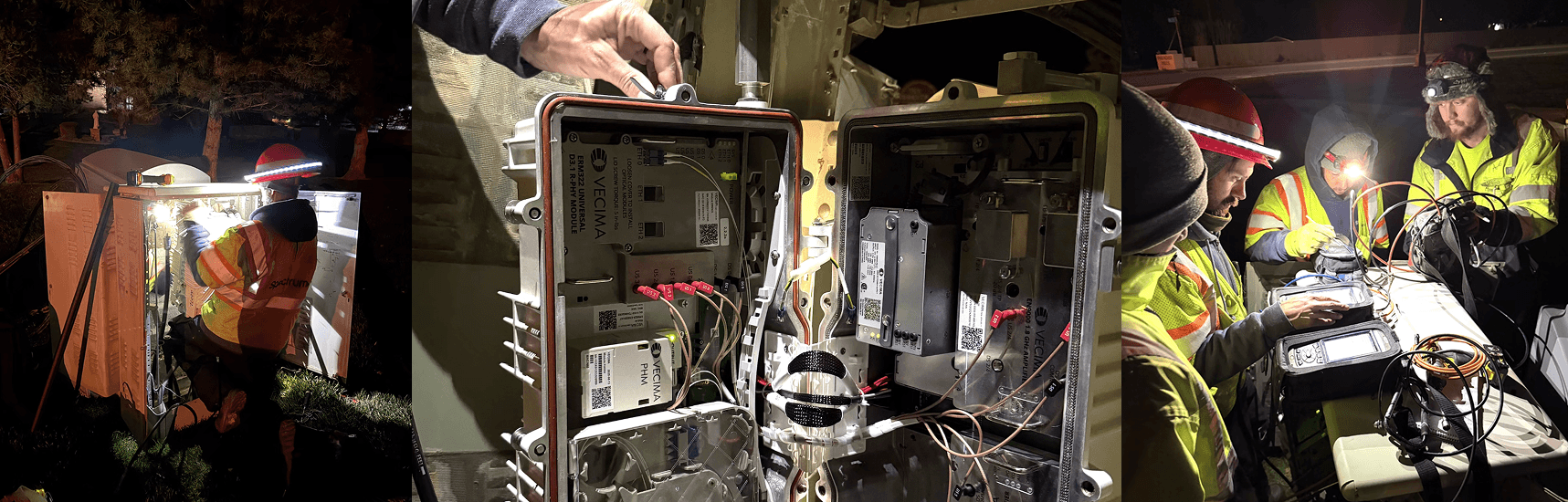
In the DAA model, fiber delivers optical signals to neighborhood hubs. At the hub, the key conversion occurs within the node housing via the Remote PHY Device (RPD). The RPD converts laser light from the fiber-optic cable into radio frequency (RF) signals that travel the final distance over existing coaxial cable to customer homes. The photo below shows a typical node housing installation, with annotations showing the RPD module and the incoming optical cable. FORCE’s primary mission is to automate RPD activation, onboarding, configuration, and lifecycle management at massive scale. It eliminates slow, manual phone coordination between field technicians and operations centers that once caused major delays and costs.
FORCE: Automating RPD Lifecycle at Massive Scale

FORCE’s primary mission is to automate RPD activation, onboarding, configuration, and lifecycle management at massive scale. This eliminates the slow, manual phone coordination between field technicians and operations centers that once caused major delays and significant costs, delivering faster, more reliable deployments with reduced operational overhead and improved efficiency across the entire workflow.

Critical Conversion Point
FORCE: Automating RPD Lifecycle at Massive Scale

FORCE’s primary mission is to automate RPD activation, onboarding, configuration, and lifecycle management at massive scale. This eliminates the slow, manual phone coordination between field technicians and operations centers that once caused major delays and significant costs, delivering faster, more reliable deployments with reduced operational overhead and improved efficiency across the entire workflow.

The Problem with Activating RPDs

Installing and activating an RPD requires technician crews to travel to node housings, often at night during cutovers, to physically install and connect the device. To understand this process, a team business analysts shadowed a technician crew overnight. At my request, he shared a thorough walkthrough with photos from the installation. These understandings revealed the actual challenges field teams face. Before FORCE, activation was slow and costly. On-site technicians called Regional Operations Centers to reach agents who manually guided troubleshooting, configuration, and system updates. Long holds, repeated explanations, and agent-led steps caused major delays, bringing about significant labor costs each night. FORCE eliminates these problems by automating key onboarding and activation steps, letting technicians to scan, configure, and activate devices via mobile or web with minimal back and forth. This saves time, decreases errors, and significantly lowers costs.

User Research
Discovering Who Really Uses FORCE

To design FORCE effectively, I met with team leads, requested direct user contacts, and conducted video interviews with stakeholders and end users. This research distilled two primary personas that shaped every major decision in the redesign and new features. These two personas kept our work sharply focused and user-centered: intuitive monitoring and escalation tools with dark mode for ROC users handling overnight shifts, and advanced real-time diagnostics with reduced eye strain for AEO engineers managing upstream complexity and 24/7 operations. They influenced every pattern refresh, feature addition, layout decision, and accessibility choice, including the deliberate support for both light and dark modes to serve FORCE’s round-the-clock users.

User Research
Discovering Who Really Uses FORCE

To design FORCE effectively, I met with team leads, requested direct user contacts, and conducted video interviews with stakeholders and end users. This research distilled two primary personas that shaped every major decision in the redesign and new features. These two personas kept our work sharply focused and user-centered: intuitive monitoring and escalation tools with dark mode for ROC users handling overnight shifts, and advanced real-time diagnostics with reduced eye strain for AEO engineers managing upstream complexity and 24/7 operations. They influenced every pattern refresh, feature addition, layout decision, and accessibility choice, including the deliberate support for both light and dark modes to serve FORCE’s round-the-clock users.

ROC Users & Admin (Outside Plant – OSP)

ROC (Regional Operations Center) users and admins focus on monitoring and maintaining HFC network health downstream of the RPD. They have moderate technical expertise compared to AEO users. When issues arise beyond basic monitoring, they escalate by calling AEO for assistance. • Primary Responsibilities: Monitor and maintain HFC network health, with emphasis on real-time status checks, alert triage, and coordination of field activities. • DAA Area of Interest: Downstream of the RPD (last-mile coaxial delivery and service restoration). • Needs: Clear, readable web dashboards with real-time status indicators, intuitive alert prioritization, easy escalation tools, and dark mode support to reduce glare during overnight monitoring shifts. • Pain Points: Overwhelming alerts without clear context, fragmented visibility across tools, long wait times when escalating to AEO, and difficulty quickly understanding downstream impact from a central view.

AEO Admin / Network Engineering

These network operations users and engineers maintain the access network upstream of the RPD, including CIN switches, vCMTS cores, PTP clocks, and R-PHY elements. They possess higher technical expertise and are the escalation point for ROC when complex troubleshooting or configuration changes are required. • Primary Responsibilities: Monitor and maintain the access network (CIN, CMTS/vCMTS, PTP, R-PHY), perform detailed diagnostics, manage configurations, schedule software campaigns, and resolve escalated issues. • DAA Area of Interest: RPD upstream to CIN and vCMTS (core-to-node connectivity, configuration integrity, and large-scale campaign oversight). • Needs: Reliable web interface with real-time telemetry, detailed alerts and logs, audit trails, safe rollback tools, powerful configuration editors, and dark mode support for extended night-shift monitoring to minimize eye strain during long hours. • Frustrations: Fragmented visibility across tools, manual drift reconciliation, lack of centralized control over large-scale changes, and frequent interruptions from ROC escalations due to unclear downstream status.

UX Audit
Uncovering the Hidden Debt: Why the MVP Foundation Was Cracking Under Growth

While building a solid understanding of the FORCE app and it’s users, my next priority was auditing the existing UI and design system in Figma. The design system lacked structure and scalability. Colors were disconnected local styles with manual light and dark variants. There was no true component library as a single source of truth. Only a few elements were proper components; most were detached, customized pulls from IBM Carbon. Auto layout was rarely used, resulting in brittle, non-responsive layouts with no support for split-screen or ultra-wide views. The setup worked for a scrappy MVP but was not maintainable for a growing enterprise application with frequent updates. These gaps in tokens, variants, components, and responsiveness created technical debt, slowed collaboration, and risked long-term quality.
UX Audit
Uncovering the Hidden Debt: Why the MVP Foundation Was Cracking Under Growth

While building a solid understanding of the FORCE app and it’s users, my next priority was auditing the existing UI and design system in Figma. The design system lacked structure and scalability. Colors were disconnected local styles with manual light and dark variants. There was no true component library as a single source of truth. Only a few elements were proper components; most were detached, customized pulls from IBM Carbon. Auto layout was rarely used, resulting in brittle, non-responsive layouts with no support for split-screen or ultra-wide views. The setup worked for a scrappy MVP but was not maintainable for a growing enterprise application with frequent updates. These gaps in tokens, variants, components, and responsiveness created technical debt, slowed collaboration, and risked long-term quality.

Design System Rebuild
Building a Scalable Design System: From Ad-Hoc Chaos to Single Source of Truth

After the audit revealed disconnected colors, detached components, brittle layouts, and no single source of truth, I prioritized rebuilding a maintainable design system from the ground up. I started with color as the foundation, then extended the system to typography, spacing, and custom components to support FORCE’s growing complexity and 24/7 usage.

Design System Rebuild
Building a Scalable Design System: From Ad-Hoc Chaos to Single Source of Truth

After the audit revealed disconnected colors, detached components, brittle layouts, and no single source of truth, I prioritized rebuilding a maintainable design system from the ground up. I started with color as the foundation, then extended the system to typography, spacing, and custom components to support FORCE’s growing complexity and 24/7 usage.

Establishing a Centralized Color System

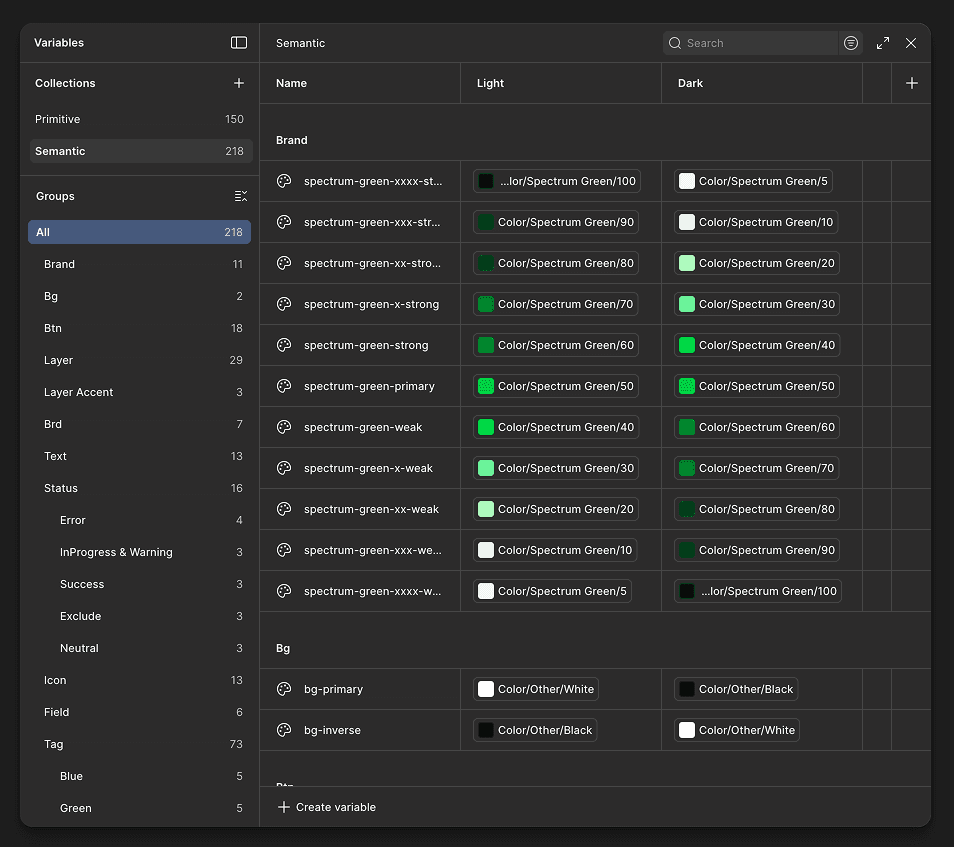
I created a structured, three-layer color system to replace ad-hoc styles: • Primitive tokens for raw color values (base hues, tints, shades). • Semantic tokens that give meaning to primitives (primary, success, error, background). • Component-level styles that apply semantics to UI elements (button-primary, card-background). I set up Light and Dark mode directly in Figma's Variables panel. Toggling the mode at the collection level instantly updates all primitives, semantics, and components across every frame and prototype with no manual overrides needed. The system became the single source of truth: any token change automatically refreshed related components, removing manual fixes and preventing inconsistencies.

Typography System: Establishing a Robust Typescale

The original typography in the Final Wireframes file was inconsistent and underdeveloped. This limited flexibility and made maintaining visual hierarchy difficult across the product. To create a more intentional, scalable, and standards-aligned typography foundation, I designed a comprehensive typescale system: • Defined semantic heading families with purposeful weight contrast, eliminating arbitrary weight decisions. • Expanded the type style set to cover real UI needs: Heading, Kicker, Paragraph, Label, and Link. • Built the entire system on a variable/token foundation within the Design System, establishing core primitives for Typeface Family, Font Size, Font Weight, Line Height, and Letter Spacing. This variable-driven typographic scale became the backbone of predictable, maintainable typography across the entire product experience.

Applying the Palette and Typescale to IBM Carbon Components

With both the color system (primitive and semantic tokens) and the refined typescale in place, I systematically updated the IBM Carbon-based component library in our UI kit to fully align with the new design language. This involved: • Remapping Carbon’s default color values to our Spectrum-aligned primitive and semantic tokens • Replacing Carbon’s native typography with the new typescale • Enforcing consistent spacing using the established spacing scale The outcome was a cohesive, branded component set. Every component now automatically inherits the correct colors, typography, and spacing. This eliminated manual overrides, drastically reduced visual inconsistencies.

Building Custom Components When Needed

In cases where IBM Carbon components did not fully meet FORCE’s specific needs (for example, unique workflow states, complex topology visualizations, or specialized status indicators for RPD jobs), I built custom components from the ground up. These custom elements still leveraged our centralized color, type, and spacing systems for consistency, but included tailored variants, states, and behaviors to support FORCE’s mission-critical workflows.

File Management and Team Scalability

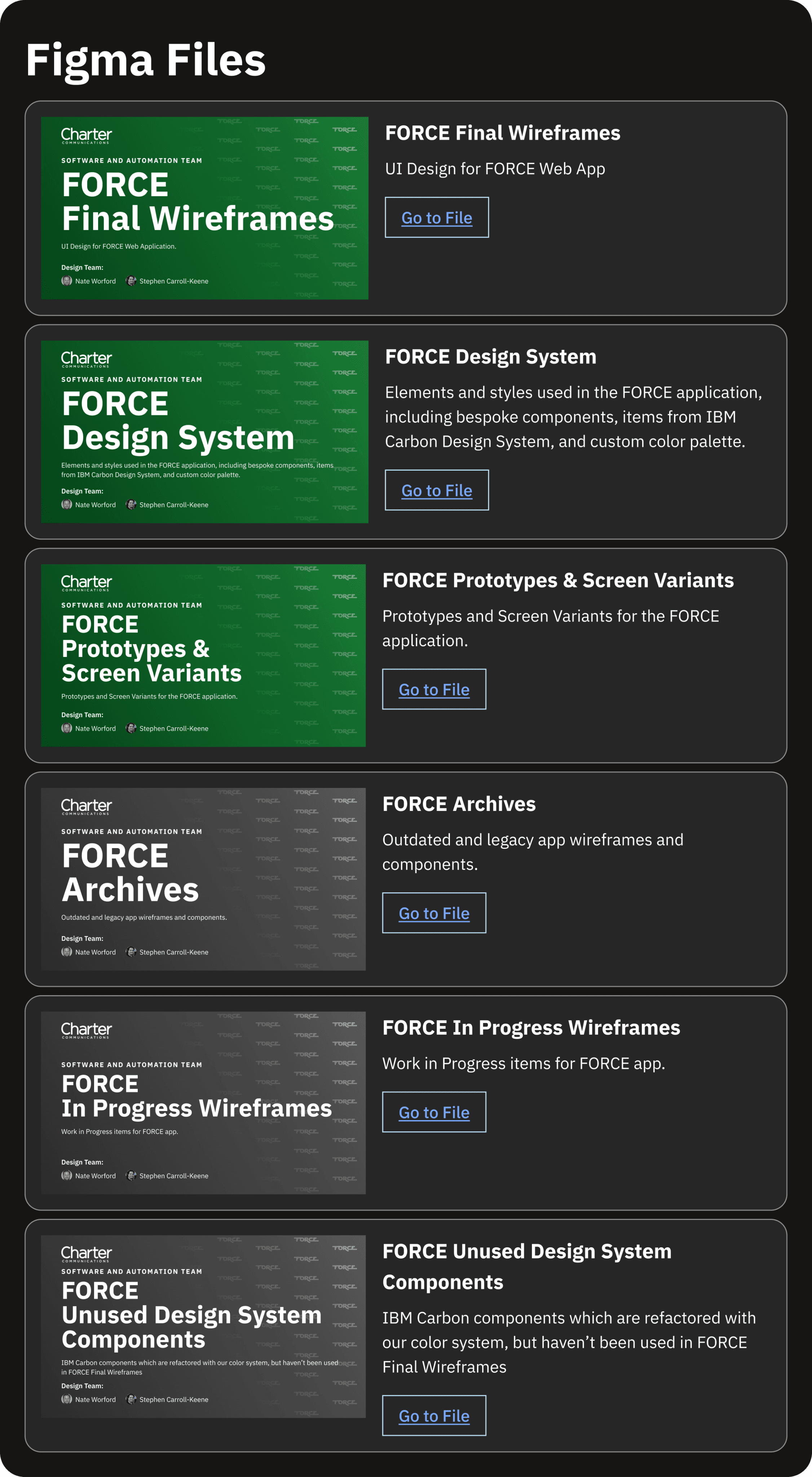
After layoffs left me as the only designer on the team, I took full ownership of reorganizing the Figma project to boost efficiency and make it sustainable long-term. The main Final Wireframes file was hitting memory limits, filled with outdated versions, and had chaotic tabs that slowed down navigation. I restructured the tabs in Final Wireframes to match the FORCE web app's navigation exactly, so every page became instantly findable. To fix performance and reduce bloat, I split content into dedicated files: • Archives: old versions and legacy designs • Prototypes and Screen Variants • Team Resources: central hub linking to assets and information These changes cut file size dramatically, sped up workflows, and created a clean, scalable structure that supports onboarding new designers with zero friction.
Tech Debt Cleanup
Tackling Lingering UI Debt: Quick Wins for Better Usability

Once the design system was rebuilt and wireframes refactored, I used available time between new feature requests to tackle lingering technical debt in core UI patterns. I compiled a prioritized list of high-impact components to improve: • Tables • Tabs • Notifications • Modals • Buttons I focused on the elements that would deliver the biggest usability gains with relatively low development effort.

Tech Debt Cleanup
Tackling Lingering UI Debt: Quick Wins for Better Usability

Once the design system was rebuilt and wireframes refactored, I used available time between new feature requests to tackle lingering technical debt in core UI patterns. I compiled a prioritized list of high-impact components to improve: • Tables • Tabs • Notifications • Modals • Buttons I focused on the elements that would deliver the biggest usability gains with relatively low development effort.

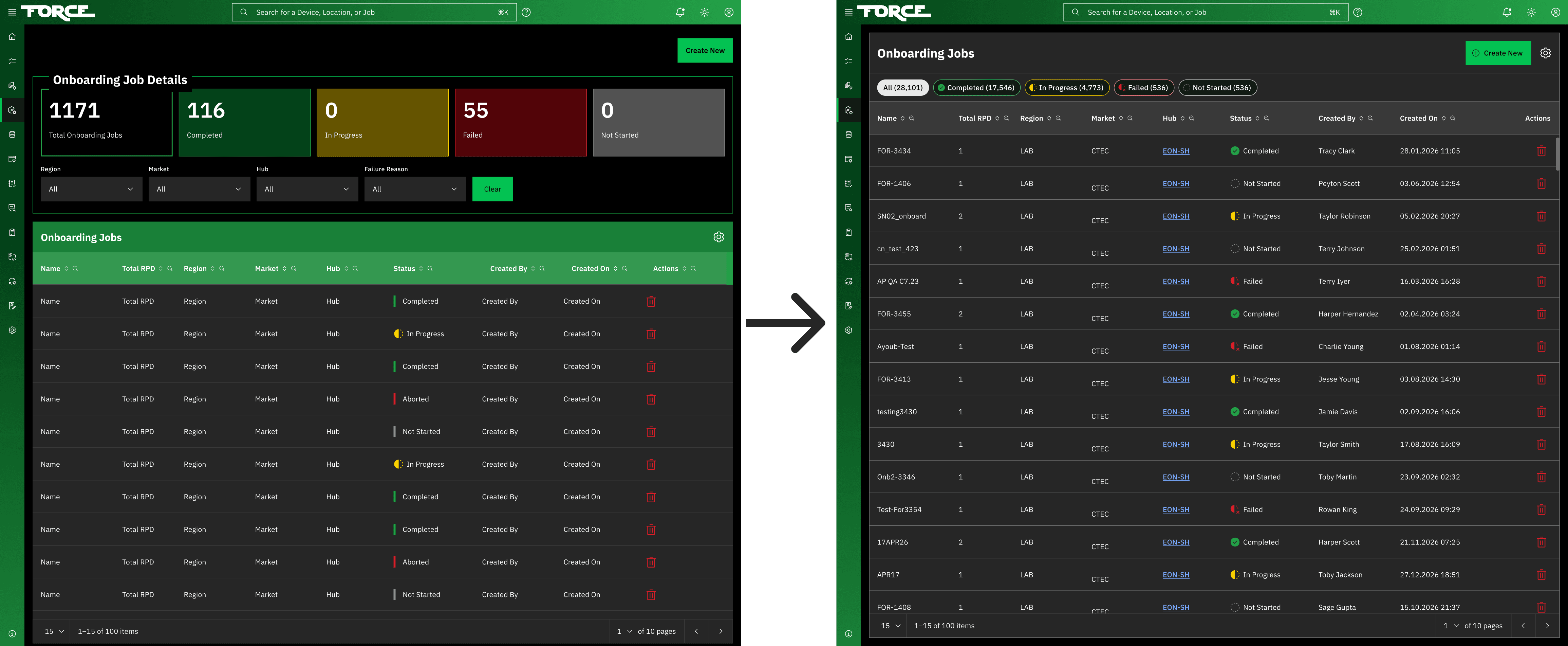
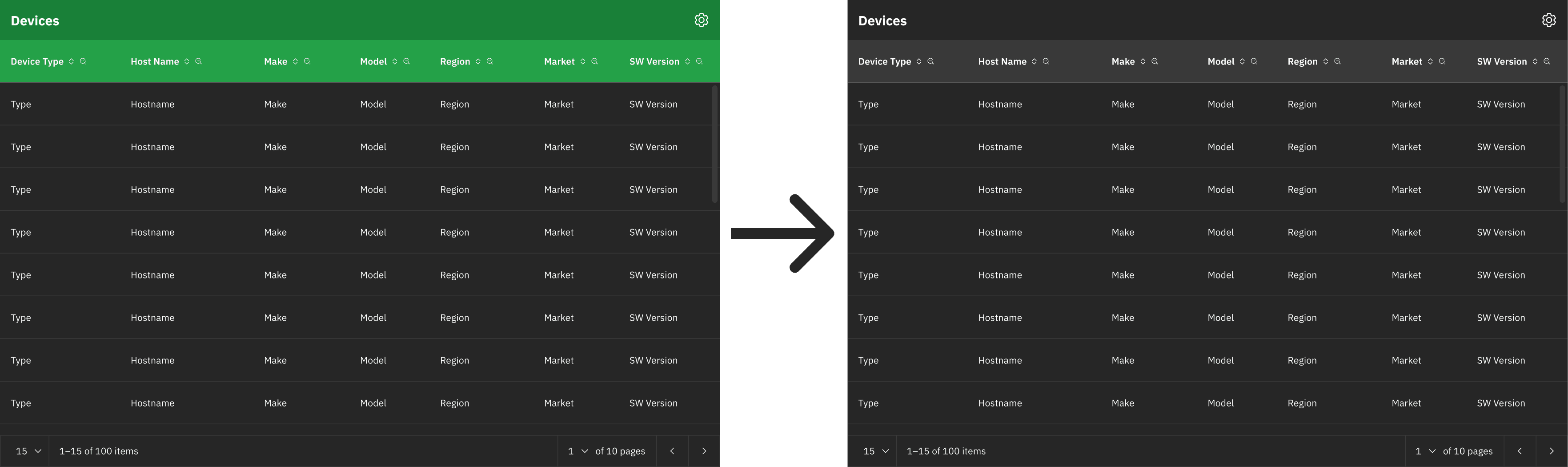
Tables: Restoring Visual Hierarchy with Neutral Headers

In the original design, data table headings and subheadings used a vibrant green that matched the primary button color too closely. This created visual competition and distracted users from key CTAs. I redesigned the table headers and subheaders with neutral gray shades to clearly separate structural elements from interactive ones, while keeping strong typographic contrast and scannability. This small change restored proper visual hierarchy in dense data views, gave primary actions more prominence, and made the interface feel calmer, more focused, and professionally balanced with minimal implementation effort.

Tabs: Clarifying Selection States and Improving Scannability

In the original design, tab labels used the same vibrant green text as primary buttons. This caused visual confusion, making tabs appear clickable like actions rather than navigational elements, and hurting scannability in multi-tab views. I redesigned the tab component to follow a clean, familiar pattern: default state with neutral gray text and a subtle thin underline, selected state with a thicker, more prominent green underline to clearly show focus and active selection. This eliminated the button-like competition, strengthened visual hierarchy, made tab navigation faster and more intuitive, and aligned the pattern with modern accessibility and usability standards. The change delivered noticeable improvements in task flow with relatively low effort.

Notifications: Modernizing Toast Placement

In the legacy app, temporary toast notifications appeared centered on the screen. This placement suited modals but disrupted user focus and obscured content during active tasks. To align with modern UX standards like Material Design and Apple HIG, I repositioned toasts to the bottom-right corner. They now unobtrusively stack, slide in smoothly from the right, respect viewport boundaries, and stay easily glanceable without interrupting primary workflows. This small, high-impact change reduced perceived interruptions, improved task continuity, and gave the interface a more polished, professional feel with minimal engineering effort.

Modals: Standardizing Button Placement for Consistent Decision-Making

In the legacy application, modal dialogs had inconsistent button placement. Some positioned primary and secondary actions on the right, others on the left. This created cognitive friction and forced users to hunt for controls every time a modal appeared. I standardized the layout across all modals by placing the button group on the far left (aligned with LTR reading direction), with the primary action leftmost, followed immediately by secondary actions to its right. This followed established UX patterns that prioritize predictable affordance, reduce scanning time, and build muscle memory. The change made confirmation, cancellation, and submission feel intuitive and frictionless. It delivered immediate consistency to a high-frequency interaction, improved perceived interface reliability, and required only targeted component updates with minimal engineering effort.

Buttons: Establishing Clear Visual Hierarchy for Confident Decisions

In the legacy FORCE app, many screens had a flattened button hierarchy, with multiple primary-styled buttons placed side-by-side (for example, a destructive red primary button next to two green primary buttons). This caused visual competition, diluted focus, and made it harder for users to quickly spot the recommended or happy-path action. To follow modern UI patterns from Material Design, Apple HIG, and enterprise best practices, I enforced strict button hierarchy: only one primary green button per organism or screen section, paired with secondary gray outlined buttons for less prominent actions and a secondary outlined destructive button for cautionary flows. This change focused on the most frequent and desired action, reduced decision paralysis, improved scannability, and created a calmer, more predictable, and professionally trustworthy interface, all implemented through targeted component updates with minimal engineering effort.

Metric Tiles and Filter Redundancy

A common design pattern across several pages used large metric tiles at the top of the view. These tiles displayed key counts (e.g., "Completed," "In Progress") and served as quick filters for the table below. Although glanceable, the tiles duplicated functionality already available through the table's column headers. Redundant dropdown filters beneath the tiles existed because of an early technical limitation: column-header filtering originally supported only typed queries, not dropdown selections. After receiving approval from the development manager to add native selectable dropdowns in the column headers, I recommended removing the redundant dropdown filters entirely. The updated design now includes a toggle to show or hide the filter row, giving users control over layout density and reducing visual clutter. These changes remove unnecessary UI elements, improve accessibility and focus, and align the interface with modern data-table best practices, making daily use more intuitive for operators and engineers without requiring major architectural changes.

Onboarding

The Onboarding page originally used the metric tiles pattern to show "All" onboarding jobs along with status breakdowns: Completed, In Progress, Failed, and Not Started. Redundant dropdown filters sat below the tiles due to the same initial limitation of typed-only column filtering. With selectable dropdowns now enabled in the table headers, the new design replaces the tiles with compact selectable tags below the table heading. These tags provide the same filtering options (All, Completed, In Progress, Failed, Not Started). The separate dropdown filters have been removed, creating a cleaner, more consistent, and less cluttered interface.

Devices

The Devices page is an inventory view for network device types, with main categories: All, RPDs, CMTS, CIN, and Other. In the original design, selecting a category tile (for example, CMTS) revealed nested sub-tabs inside the tile for brand breakdowns (such as Harmonic and Vecima). This non-standard pattern of tabs within tiles caused usability and scalability issues. The redesigned layout removes the metric tiles and uses selectable tags above the table for the main categories. When a category has sub-options (for example, selecting CIN), a Content Switcher component (from IBM Carbon) appears below the tags for clean sub-navigation (All, ANA, APA, ARA, ASA, AVA). This approach improves hierarchy, consistency, and accessibility while supporting future expansion without resorting to unconventional UI patterns.

New Design Features
Global Search Feature

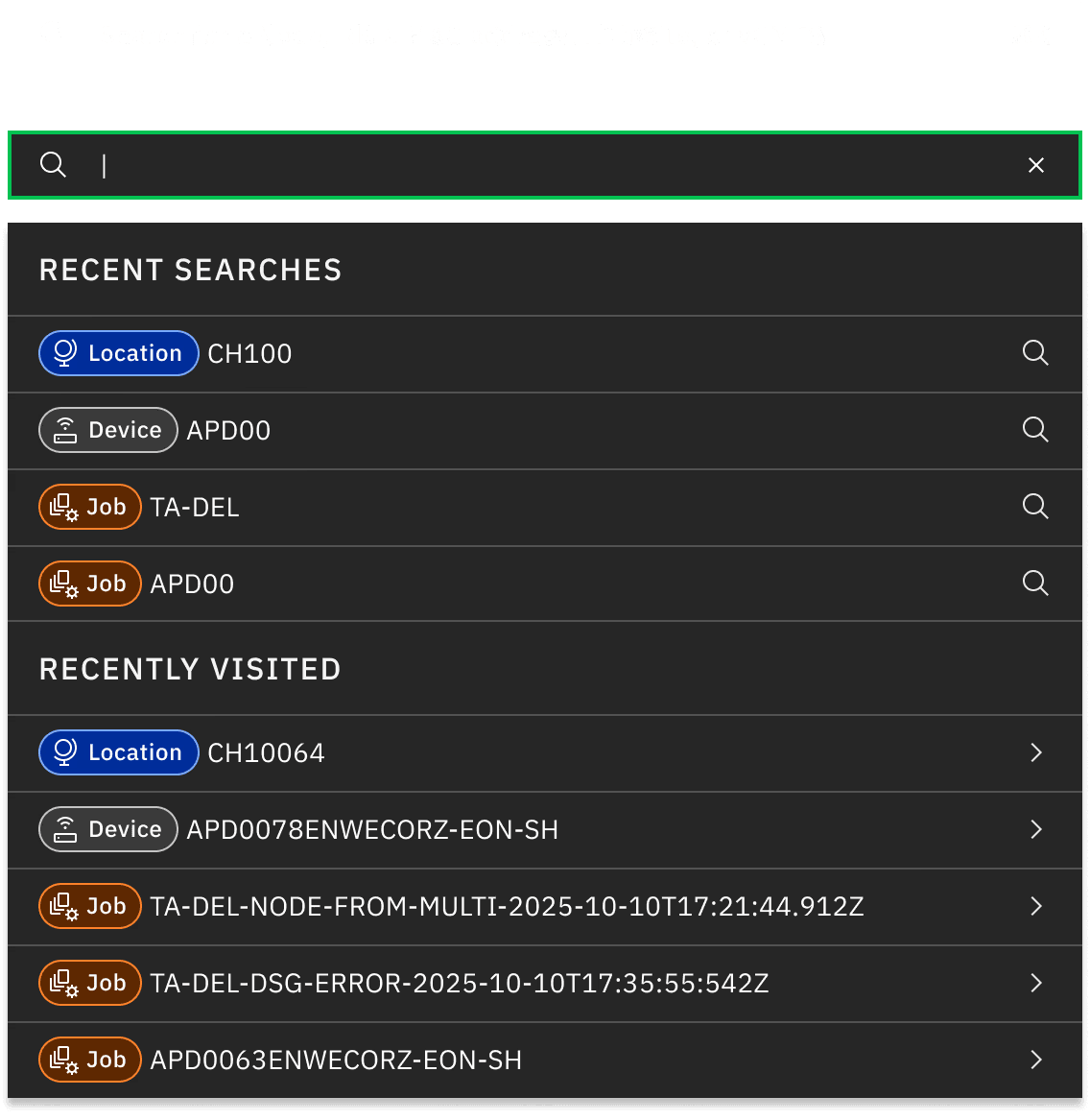
Users across roles often needed a faster way to find devices, locations, and jobs in the FORCE platform due to the network's scale and high volume of workflows. I owned the design and delivery of this high-impact search feature. I added a prominent, centrally aligned search field to the top navigation bar for maximum visibility and accessibility. To the right, I included a Command+K hotkey indicator for keyboard users and an info icon with a hover tooltip for search syntax and tips. For v1, users entered at least 3 characters and selected one category (Device, Location, or Job) to ensure precise results and avoid system overload. If the query was too short, no category was chosen, or no matches were found, a clear inline error message appeared below the field with guidance to refine the input. Future plans include category-free universal search, recent history, and autocomplete suggestions to speed up common tasks. This feature reduced navigation time significantly for operators and engineers managing large inventories and active jobs, speeding up daily workflows.

New Design Features
Add a Device Workflow

One of the most frequently requested capabilities from network engineers and ANO operators was a streamlined way to add new RPDs to the system, whether for testing, replicating existing configurations, or deploying fresh Greenfield installations. Before this feature, the process involved manual configuration cloning via CLI or scattered tools, which was time-consuming, error-prone, and difficult to audit. I designed the "Add a Device" workflow as a guided, multi-step wizard to make onboarding safe, consistent, and efficient. The flow starts by letting users choose one of three entry points: • Clone an Existing RPD • Copy a Test RPD • Greenfield RPD

Pending Onboarding Report

Network operations teams struggled to identify and prioritize nodes ready for RPD onboarding. Engineers had to manually cross-reference multiple systems, spreadsheets, and reports, often missing issues that delayed activation. I designed the Pending Onboarding Report as a centralized dashboard page. It automatically generates a curated list of nodes scheduled or eligible for onboarding, giving users an at-a-glance view of priorities. Users select one or more nodes, then follow a guided configuration step to set parameters (service group templates, channel assignments, scheduling). On submission, the system creates an onboarding job and redirects to the Job Details page for real-time status, progress, logs, and audit trail via Job History timeline. This feature transformed a fragmented, reactive process into a proactive workflow. It reduced preparation time, minimized activation failures caused by overlooked issues, and gave operators confidence in large-scale onboarding campaigns.

Job History Column and Timeline

Leaders and operators needed better traceability in FORCE workflows. Jobs like activations and campaigns often failed initially due to transient issues, then got retriggered after fixes. Without clear records of who started what and when, troubleshooting was slow and error-prone. I designed and added a Job History column and timeline section to key detail pages: Onboarding, Activation, OFDMA, Software Campaign, and RPD Migration. The timeline shows a chronological, auditable log of every major event in a job's lifecycle, always including: • Who initiated the job (user name or service account) • Timestamp • Key events: failures with error details, retriggers, manual interventions, rollbacks, and final outcome The result is a cleaner, modern layout: timestamped entries with avatars/icons, color-coded status, expandable details, and chronological order. Users gained full visibility into job lifecycles, easier debugging, stronger audit compliance, and a less cluttered interface.

Retrospective
Lessons from Solo Leadership: What I Learned Turning FORCE Around

This project was my most challenging UX leadership experience to date. It demonstrated how foundational design work can unlock significant operational scale in enterprise settings.

What I did well

• I quickly mastered a complex domain and translated it into intuitive experiences. • I set clear priorities: design system foundation first, followed by pattern improvements, then high-value features. • I built for longevity by creating maintainable assets and organizing files for future team members. • I earned trust from engineering and product teams by delivering feasible, feedback-driven designs. • I remained resilient and proactive during layoffs and hiring freezes while maintaining quality.

Results
What I did well

• I quickly mastered a complex domain and translated it into intuitive experiences. • I set clear priorities: design system foundation first, followed by pattern improvements, then high-value features. • I built for longevity by creating maintainable assets and organizing files for future team members. • I earned trust from engineering and product teams by delivering feasible, feedback-driven designs. • I remained resilient and proactive during layoffs and hiring freezes while maintaining quality.

What I would improve next time

• Engage end users earlier with more direct field shadowing and usability testing. • Formalize documentation sooner (living style guide, decision log) to make handoffs easier. • Protect bandwidth earlier by escalating hiring needs or proposing contractor support. • Incorporate lightweight validation (A/B tests, heatmaps) on critical patterns before final handoff.

Results
What I would improve next time

• Engage end users earlier with more direct field shadowing and usability testing. • Formalize documentation sooner (living style guide, decision log) to make handoffs easier. • Protect bandwidth earlier by escalating hiring needs or proposing contractor support. • Incorporate lightweight validation (A/B tests, heatmaps) on critical patterns before final handoff.

FORCE is now more than an automation tool; it is a reliable partner in Charter’s network future, with UX at the core of its success. I look forward to applying these lessons to even larger-scale challenges.

Results
FORCE is now more than an automation tool; it is a reliable partner in Charter’s network future, with UX at the core of its success. I look forward to applying these lessons to even larger-scale challenges.

Thanks for stopping by 👋

Feel free to dive into more of my
case studies below.

Thanks for stopping by 👋

Feel free to dive into more of my
case studies below.
Spectrum software image

Streamlining Pre-Sales Operations with a Centralized Web Hub

Spectrum software image

Streamlining Pre-Sales Operations with a Centralized Web Hub

Spectrum software image

Streamlining Pre-Sales Operations with a Centralized Web Hub

Spectrum software image

Boosting Security and Efficiency with an AI Chatbot and Admin Tool

Spectrum software image

Boosting Security and Efficiency with an AI Chatbot and Admin Tool

Spectrum software image

Boosting Security and Efficiency with an AI Chatbot and Admin Tool

Journey.AI

Showcasing Patented Encryption and Revolutionizing User Experience

Journey.AI

Showcasing Patented Encryption and Revolutionizing User Experience

Journey.AI

Showcasing Patented Encryption and Revolutionizing User Experience

Spectrum software image
Wager Casino

Launching the World’s First Crypto Casino with Tier-1 SportsBook

Spectrum software image
Wager Casino

Launching the World’s First Crypto Casino with Tier-1 SportsBook

Spectrum software image
Wager Casino

Launching the World’s First Crypto Casino with Tier-1 SportsBook